Finding the Shot You Half Remember: A Photographer's Archive Searched by Image Embeddings
Imagine a commercial photographer with about 60,000 keepers from twelve years of shoots. A client calls. They want the shot of the red chairs on the stage from one of their events, or something like it, and wider if she has one. She can picture it. She can’t place which event it was, and her keywords from back then are patchy.
Image embeddings are good at this kind of memory. A CLIP model such as ViT-B/32 turns each photo into 512 numbers, and photos that look alike end up close together. It can turn a sentence into numbers in the same space, so “red chairs on a stage” lands near photos of red chairs on a stage. The rest of what she knows, which client it was for and that she only wants her four- and five-star picks, are facts, and facts belong in fields and links.
How the Archive Is Laid Out
Each photo is a record with its capture time, camera, lens, star rating, file path and vector. Each shoot is a record, and so is each client. Two kinds of link tie them together: a photo is in a shoot, and a shoot is for a client. A script fills the file from the photos’ metadata, or straight from a Lightroom Classic catalog, which is an SQLite database itself. It runs the CLIP model once per photo, and after the first run only new photos need a vector.
The images stay where they are. The file holds facts and vectors, and the path to each photo on disk.
A Sentence Gets Her Close
She starts with words, across the whole archive, keeping only her best picks:
hypercrux nearest archive.db photo "$(embed red chairs on a stage)" -k 12 --where "rating >= 4"
Here embed stands for a small command that runs the text half of the CLIP model and prints the vector as a JSON array. Among the twelve results is photo:2026-05-14-0231. It’s the right event and the right chairs, framed too tight.
Then the Photo Does the Searching
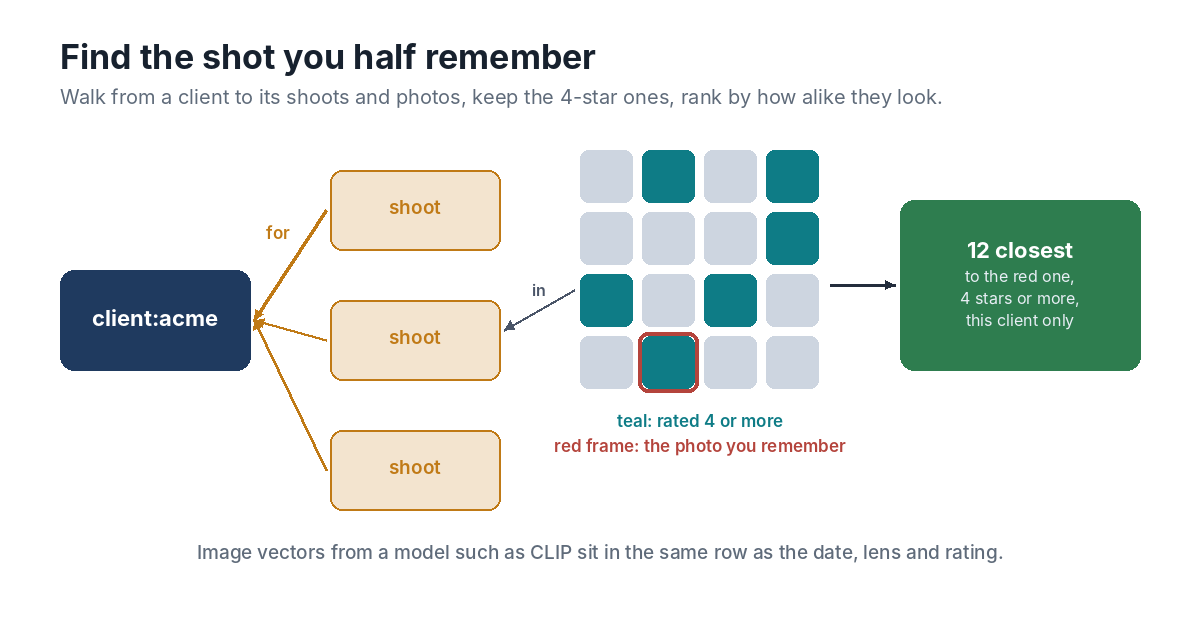
Now she has a photo to search with. She asks for the twelve closest to it among this client’s photos rated four stars or more:
hypercrux sql archive.db "
  SELECT p.key, p.taken, p.rating
  FROM json_each(walk('client:acme', 2, NULL, 'in')) w
  JOIN photo p ON p.key = w.value
  WHERE p.rating >= 4 AND p.key <> 'photo:2026-05-14-0231'
  ORDER BY distance(p.vec, (SELECT vec FROM photo WHERE key = 'photo:2026-05-14-0231'))
  LIMIT 12"
The walk goes two links backwards from the client, first to its shoots and then to the photos in them. NULL means any type of link. The query compares those photos with the one she found, using its stored vector, so this search doesn’t run the model at all. SQLite works through the walk first and looks up each photo by its key, which means only this client’s photos get compared, however big the archive grows.
If she wants to see where else she has shot something like it, for any client, the same photo works as the question on its own:
hypercrux nearest archive.db photo photo:2026-05-14-0231 -k 12 --where "rating >= 4"
Given a key instead of a vector, nearest uses that record’s vector and leaves the record itself out of the results.
How Long It Takes
In the recorded benchmarks on a two-core cloud machine, a search among 100,000 vectors of 384 values took 0.41 seconds. Her archive is 60,000 photos at 512 values each, which is less arithmetic than that benchmark. The client search is smaller again, since it only compares one client’s photos.
That’s also where the design stops making sense. Exact search compares every vector, so a library of ten million images wants an approximate index, and HyperCrux doesn’t have one.
What the Model Can and Can’t Do
CLIP is good at what’s in a picture and the colours it’s in. It’s weaker at fine distinctions such as exact framing or which of two near-identical frames has the better expression, and those stay her call. The ratings are what make that work. They’re her judgement, stored as a plain number next to the model’s sense of what each photo looks like, and one query uses both.
The file sits on her workstation next to the catalog, and the whole thing runs without a network. The same layout fits other media libraries just as well: a design team’s assets linked to projects, or a sound library linked to the films that used each sound. The quick start walks through the commands used here.